Delete Shifts
Deleting a shift in Schedule Xpress allows you to quickly remove scheduled work that is no longer needed directly from the schedule.
Deleting shifts in Schedule Xpress is quick and straightforward, allowing you to remove scheduled work directly from the schedule. Whether a shift is no longer needed or was created in error, you can delete it in just a few clicks.
Delete a Shift in Schedule Xpress (Desktop)
There are two ways to delete a shift in Schedule Xpress.
Option 1: Using Shift Tools
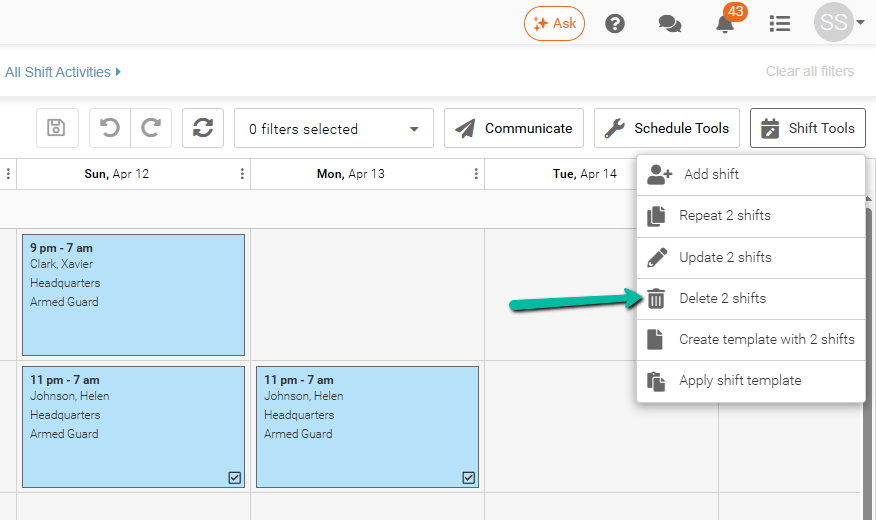
- Check mark the shift(s) you want to delete
- Click Shift Tools in the top-right corner
- Select Delete Shift(s)
- A confirmation prompt will appear
- Confirm the deletion
Option 2: Right-Click on the Schedule
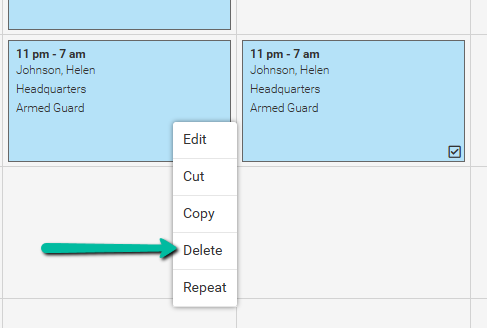
- Right-click on the shift you want to delete
- Select Delete
- A confirmation prompt will appear
- Confirm the deletion