Export Bill Rates to PDF or Excel
Export bill rate data for reporting, analysis, or record-keeping.
The export feature in Manage Rates allows administrators to download bill rate information in a convenient format for reporting, auditing, and analysis. You can export all bill rates or apply filters to generate more targeted reports.
Export Bill Rates
To export bill rates:
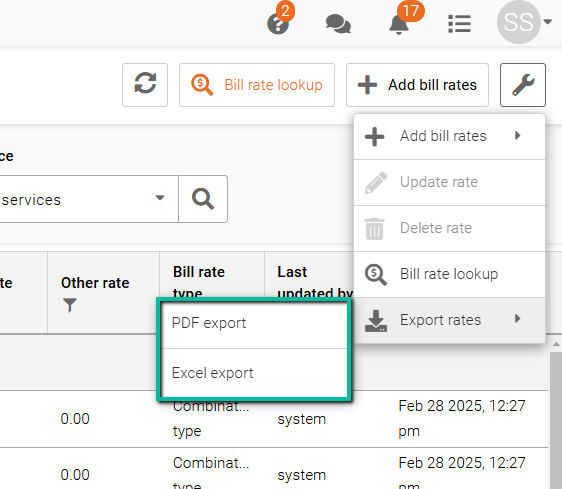
- Click the Wrench icon in the top-right corner.
- Select Export Rates.
You can export bill rates in the following formats:
- PDF Export – Generates a formatted report suitable for printing, sharing, or record-keeping.
- Excel Export – Generates a spreadsheet that can be sorted, filtered, and analyzed outside of Schedule Xpress.
Tip: Apply filters before exporting to create reports for specific employees, sites, services, or bill rate types.