Delete Pay Rates
Delete one or more pay rates quickly from the Manage Rates page.
Deleting pay rates allows administrators to remove outdated or incorrect rates and keep pay rate records accurate and up to date. Multiple pay rates can be deleted at the same time.
Delete Pay Rates
To delete a pay rate:
- Select the pay rate by checking the corresponding box.
- Click the Wrench icon in the top-right corner.
- Select Delete Rate.
To delete multiple pay rates, select multiple pay rates and follow the same steps.

Confirm Deletion and Apply Changes
After selecting Delete Rate, you will be prompted to confirm the deletion.
Important Note: Deleting a pay rate will also remove its associated history. This action cannot be undone.

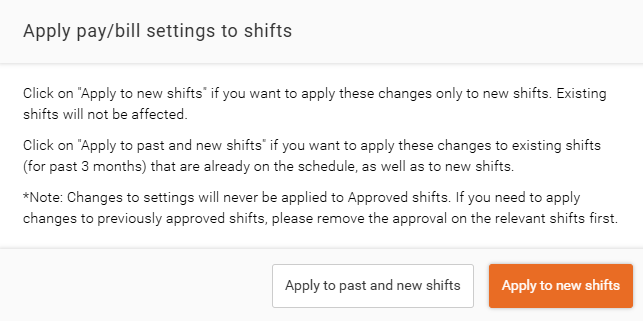
Once confirmed, choose how the deletion should be applied:
- Apply to Past and New Shifts – Removes the pay rate from the selected effective date and updates both historical and future shifts.
- Apply to New Shifts – Removes the pay rate from future shifts only and preserves historical shift data.
After selecting the desired option, click Delete to complete the process.