
Export Reports in Time Processing
Time Processing allows you to export shift, time and attendance, payroll, and billing data into a report format. This helps you review worked hours, validate payroll and billing, and share data for further analysis.
Select Data to Export
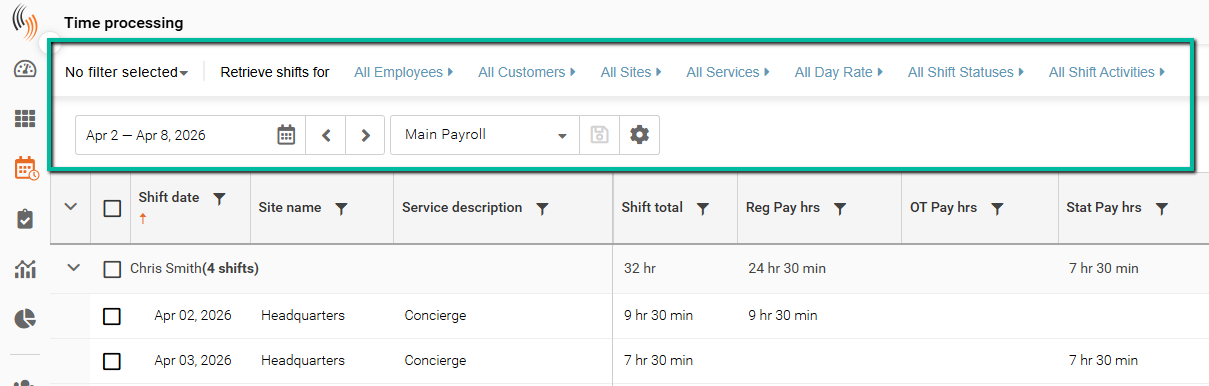
To export data from Time Processing, you'll first need to select your layout, filters, and date range to ensure the correct data displays.
Export a Report
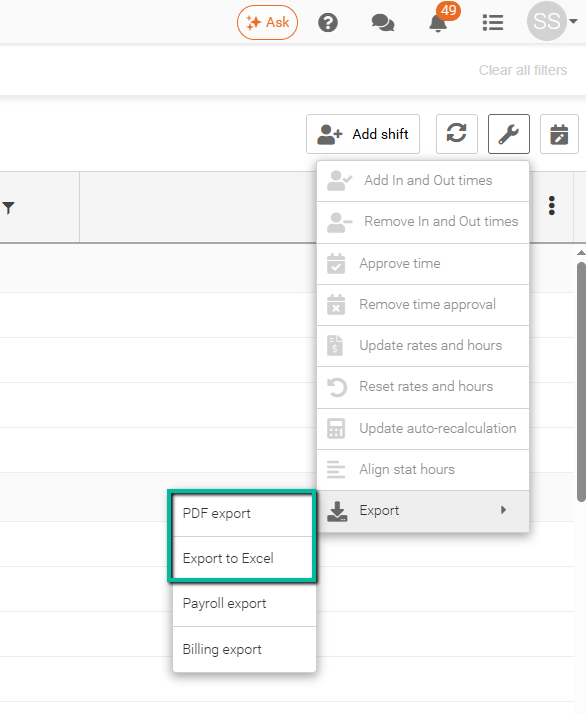
Follow these steps to export a report from Time Processing:
Select your shifts → click the Wrench tool → select Export → choose PDF Export or Export to Excel.
Exported Data
Exported reports may include the following information:
- Shift Date
- Employee Name
- Site and Service
- Scheduled and Worked Hours
- Time In and Time Out
- Pay Hours and Rates
- Bill Hours and Rates
- Shift Total
The exact data included in the export depends on the columns currently visible in the grid.
Note: You do not need to display all records on a single page before exporting. The export includes all records that match the selected filters and date range, regardless of the number of records displayed on screen.