Notifications Panel for Employees
View and manage notifications to stay updated on shifts, requests, and schedule changes in Team Xpress.
Stay informed with real-time notifications about schedule updates, shift activity, and actions that may require attention.
The Notifications panel provides updates on open shifts, confirmations, time off requests, and other important changes in Team Xpress.
Access Notifications
To view notifications:
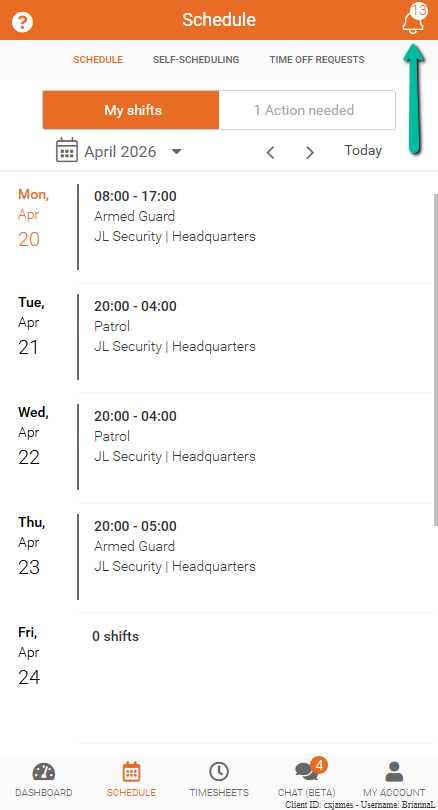
- Tap the bell icon in the top-right corner of the app
The bell icon remains visible throughout the platform.
- A number badge indicates how many unread notifications are available
Notification Types
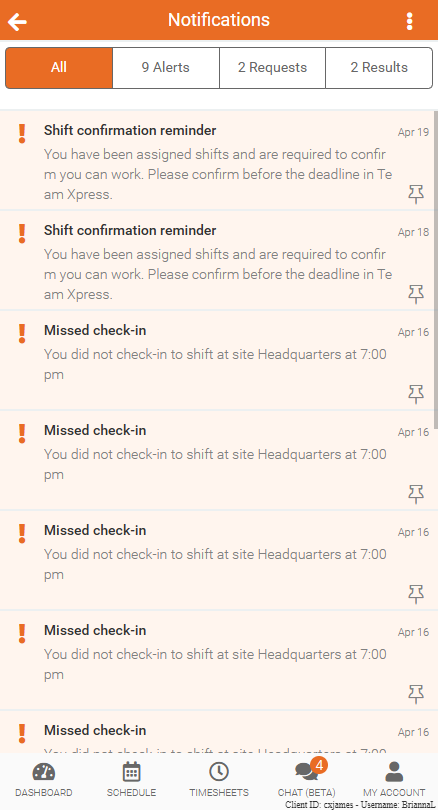
Notifications are grouped into categories to help identify their purpose:
- All – Displays all notifications in one place
- Alerts – Includes schedule changes, shift updates, and important notices
- Requests – Includes shift bidding opportunities and related actions
- Results – Shows outcomes such as approved or denied requests and shift bidding results
Notification Preferences
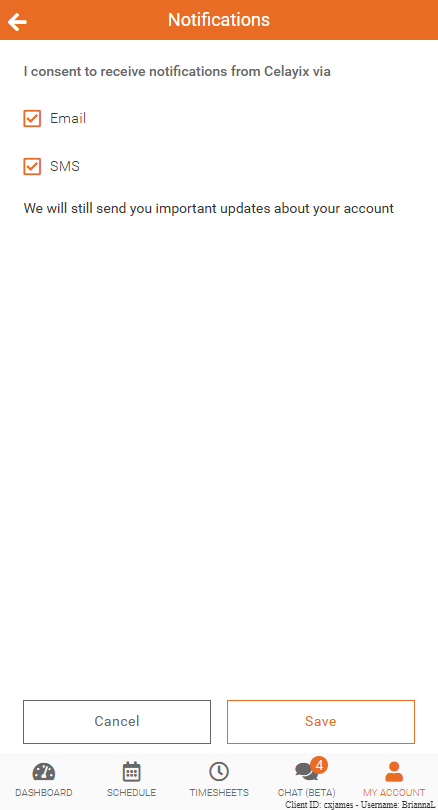
Notifications are always available in-app, with the option to receive updates by email or SMS.
To update notification preferences:
- Open Team Xpress
- Go to My Account → Preferences → Notifications
- Select preferred notification method
- Save changes
Note:
- If you do not have the option to edit these settings, your company has made notifications mandatory.
- SMS notifications are only available if enabled by the company. If unsure, contact a supervisor.