
Export Employees to PDF or Excel
Download employee records from Manage People in PDF or Excel format based on your current grid view and filters.
Export employee records from Manage People in either PDF or Excel format for reporting, review, or offline use.
Export Employee Records
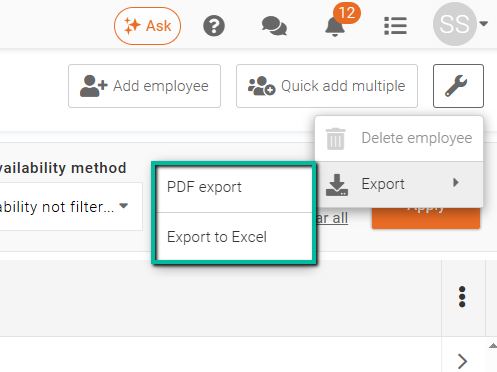
To export employee records, open Manage People and click the Tools (Wrench) icon in the top-right corner of the screen.
From the menu, select Export, then choose one of the following options:
- PDF Export – Generates a printable PDF version of the current employee records.
- Export to Excel – Downloads the employee records in Excel format for sorting, filtering, and further analysis.
The export will include the employee records currently displayed in the grid, including any applied filters, searches, or record selections.
Export Tips
Apply filters before exporting if you only want specific employee records included in the file.
PDF exports are best for printing or sharing, while Excel exports are better suited for editing, reporting, and data analysis.