Add Notes and Attachments to a Shift
Add notes and attachments to record important shift details and keep your supervisor informed.
The Add note feature allows you to document incidents, concerns, reminders, or updates directly within your shift activities. You can also attach files or photos for additional context.
Note: This feature may be enabled or restricted by your company.
Add a Note
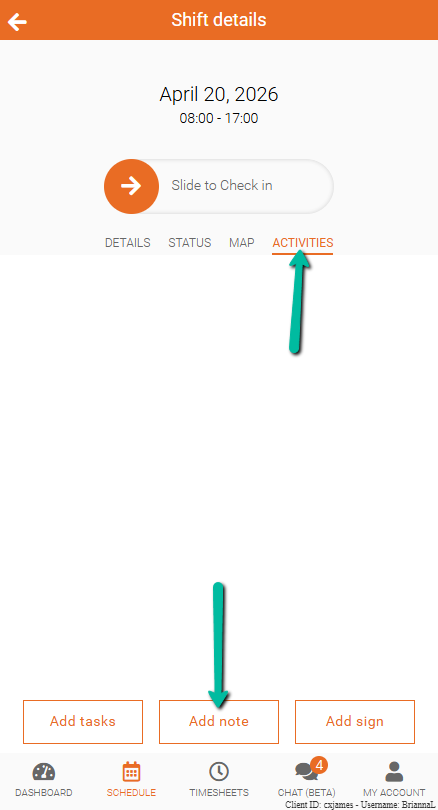
To send a note related to your shift:
- Open Team Xpress
- Go to Activities
- Tap Add note
- Enter your note
- Click Submit
Your note attached to the shift for your supervisor to review.
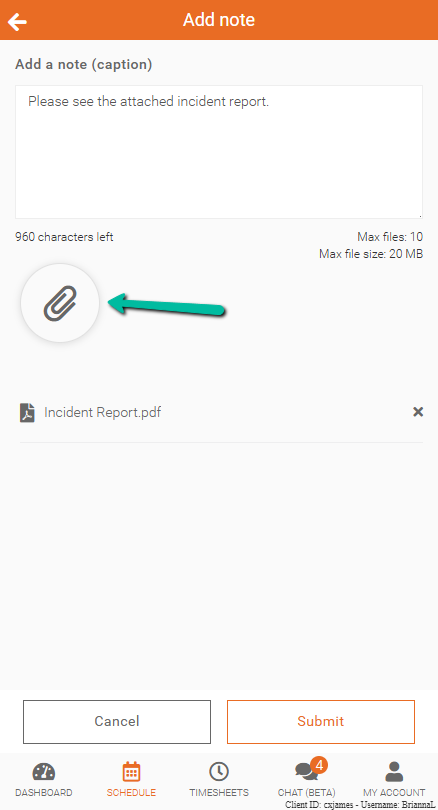
Add Attachments
You can include files or photos with your note for more detail.
To add an attachment:
- Click the paperclip icon below the note field
- Select a file from your device
- On desktop, a file selection window will open
- On mobile, your device’s file browser will open
- Click Submit to send your note and attachment
Note: Attachment availability may depend on permissions set by your admin.